C program to convert hexadecimal value to its equivalent text value to be used in Loadrunner.

For example

Hexadecimal value passed in the url: %74%65%78%74%20%76%69%6E%6F%74%68%2E%74%78%74

Text value: text vinoth.txt

Below is the C program which does the above conversion ( Hex to Plain Text conversion)


Output:


C program to convert a text into its equivalent hexadecimal value to be used in Loadrunner

Loadrunner has a built in function called web_convert_param function which converts HTML to a URL or plain text or the vice-versa.
But in my case, I had a file upload script in which the text files names that are uploaded are converted into its equivalent hexadecimal value and they were passed in the request url.
Since they were passed in the url the hexadecimal values were also appended with %.

For example

Text File uploaded : text vinoth.txt

hexadecimal value passed in the url: 74%65%78%74%20%76%69%6E%6F%74%68%2E%74%78%74%

Below is the C program which does the above conversion (Plain Text to Hex conversion)

Output:


VB Script to fetch the names of sub folders in a folder and write it to a text file

Say for example we have different file upload scenarios and we have kept the files in different folder accordingly and we have to input the file path along with the file name. Doing this manually is tedious. 

So the below VB script simplifies the work, all it does is it reads the sub folder names under the parent folder that we input and writes it to the output by concatenating the both.

VB Script:

If at all you want only the subfolder name to be written to the Output file then

comment out  --- logFile.writeline FilePath
&
remove the comment from --- logFile.writeline(objSubFolder.name)

VB script to fetch the file names and write it to a text file

We all have come across a loadrunner script in which file upload will happen and we would have parameterized the file path & file name. Consider if we have 1000's of files and we need to give them as parameter input. So entering the file path and file name manually into the file parameter would be a time consuming process.

Below VB script simplifies the above process by just a click. All we have to do is to input the file path where inputs files are placed and mention the output file to write the the same.

VB Script:

If at all you want only the file name to be written to the Output file then

comment out  --- logFile.writeline FilePath
&
remove the comment from --- logFile.writeline(file.name)

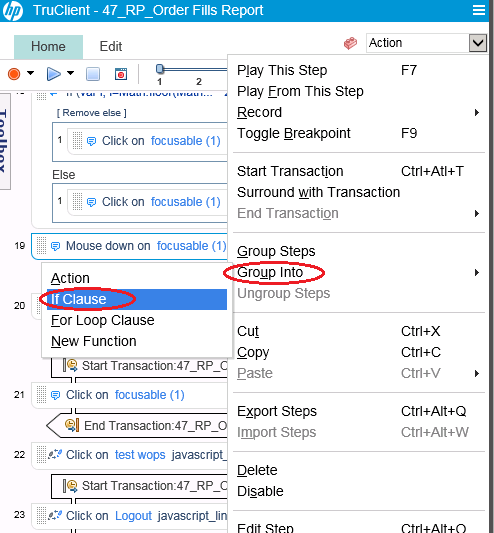
How to add IF ELSE block in Truclient Protocol Loadrunner?

Steps to add IF ELSE Condition Block in Truclient Protocol

1. Right Click the step which has to be validated and Select If Clause --> Group Into.

2. Now the selected step comes under the IF condition
3. Click the Add Else Link and drag and drop the step to executed in the Else Condition.


4. Now add a condition in the IF blocks JavaScript to validate and execute the steps.


How to resolve Drag and Scroll not working issue in TruClient Protocol Loadrunner

I was doing truclient protocol based scripting for one of the applications developed on WebSwings. So the entire webpage was considered as one single element or object and all the clicks made on that page were being recorded using their X & Y coordinates.

Issue:

  • So when I click and drag the page slider down in the scroll bar it was getting recorded as a 'Drag' step.
  • But during replay script was not able to perform the drag since it was not able to identify the object.


Solution:

  • Instead of doing a click and drag of the page slider, scroll the page by clicking on the down button in the scroll bar. 

  • It will get recorded as 'Click' step.
  • Now change the step Action from 'Click' to 'Mouse Down'. 


  • Increase the Step Minimum Time to 10 sec. This needs to be done because we need to give sometime for the page to scroll before the next step gets executed. Since Truclient is asynchronous in nature.


Similarly for drag or scroll up click the up button in the scroll bar and change the step action to 'Mouse Up'.

Thats it now your page drag will work without any issues.